Co-Creating “Pasteboard”: How I Built a Premium macOS Clipboard Manager in Minutes Using Agentic AI
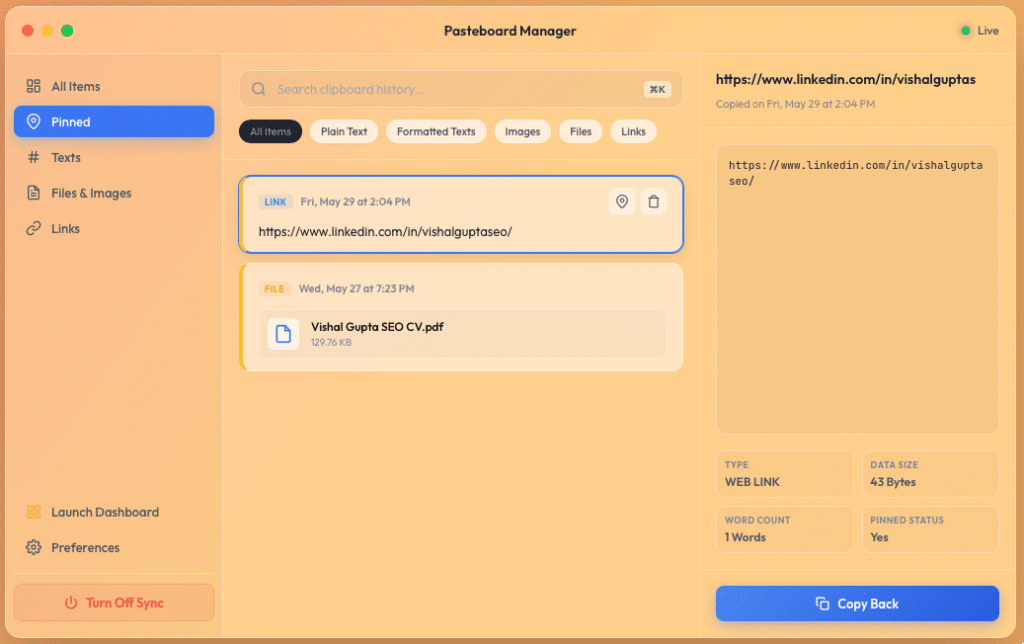
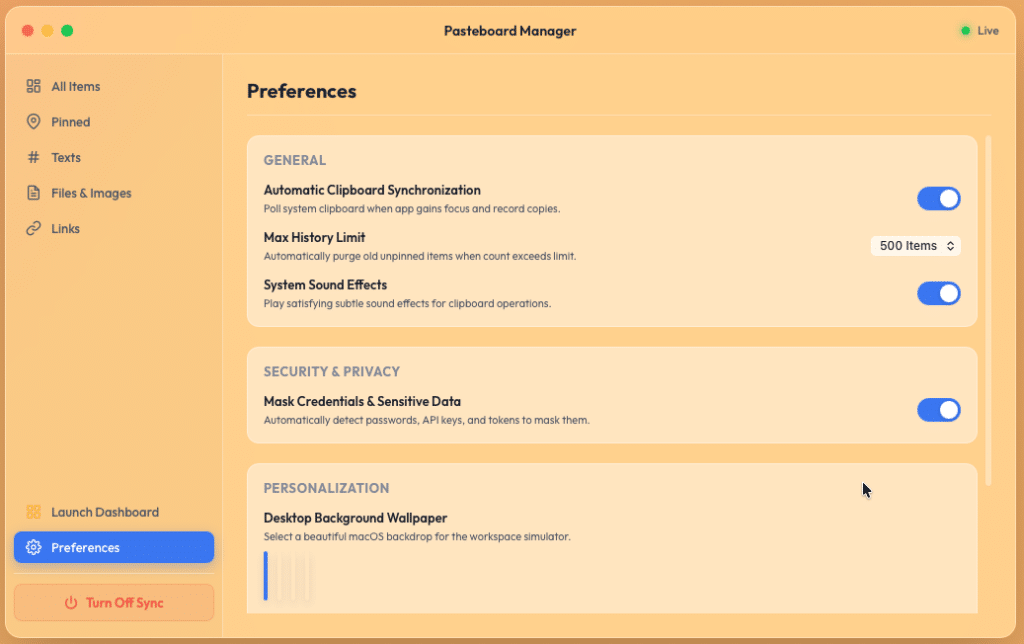
There’s a shift happening in software development, and it’s far more profound than copy-pasting AI-generated boilerplate. We are entering the era of Agentic Co-Creation—where developers partner with autonomous AI agents that don’t just write lines of code, but architect systems, debug complex runtime loops, compile native binaries, and package installers.
Recently, I set out to build Pasteboard, a high-fidelity, secure macOS Clipboard Manager. I didn’t write it alone. I built it in partnership with Antigravity, Google DeepMind’s agentic AI coding assistant.
Here is the story of how we took a conceptual idea and turned it into a native background accessory, fully compiled into a distribution-ready .dmg installer, and the complex engineering hurdles we bypassed along the way.
The Vision: A Professional, Local-First Clipboard Manager
Most clipboard managers are either bloated, subscription-based, or lack visual cohesion. I wanted to create a tool that felt like a native, organic extension of the macOS desktop itself.
The requirements were clear:
- Zero-Cloud, Pure Local Storage: Security is paramount when dealing with clipboard data. The app must run entirely offline, caching text, rich formatted text, images, and files strictly in local IndexedDB.
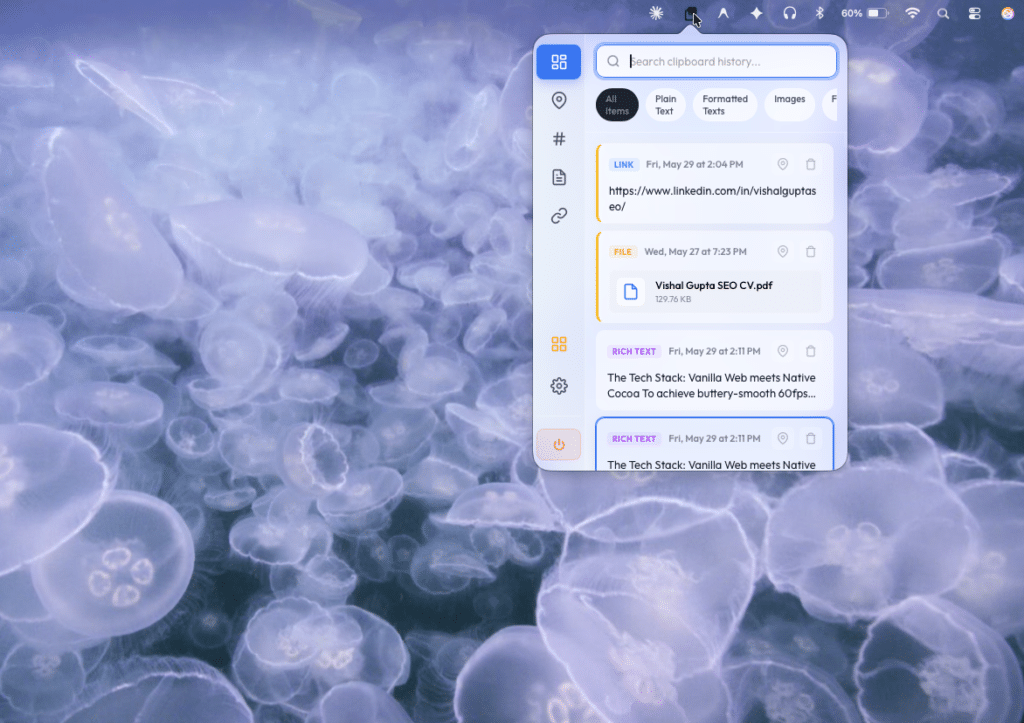
- Hybrid Architecture:
- A compact, rapid-access
NSPopovermenulet appearing right from the top system tray. - A widescreen resizable desktop Dashboard window for broad history inspection, stats, and configurations.
- A compact, rapid-access
- Mac-Native Visual Polish: Adhering to the gorgeous macOS 26 glassmorphic aesthetic—complete with dynamic organic panning wallpapers (Sonoma sunset, Sequoia forest), active indicator lights, and responsive widgets.
- Intelligent Features: Automatic credential masking for passwords/API keys and synthesised micro-sound chimes (Web Audio API) for copy feedback.
The Tech Stack: Vanilla Web meets Native Cocoa
To achieve buttery-smooth 60fps performance and zero setup overhead, we built the application UI using pure Vanilla HTML, CSS, and Javascript.
To bridge this web app to the macOS operating system, we wrapped it in a lightweight, native Swift Cocoa wrapper (main.swift) running a custom-configured WKWebView with universal file access and an accessory execution policy (.accessory mode) that keeps the macOS Dock completely clean.
Bypassing the Sandbox: The Core Engineering Feats
Building a hybrid app inside a WKWebView presents unique platform constraints. Here is how Antigravity and I bypassed three legendary macOS sandboxing and layout hurdles:
1. Bypassing WebKit Clipboard Sandboxing
Browsers strictly block navigator.clipboard.write() for binary formats (like images) or local file systems inside sandboxed web views. To solve this, we implemented an unrestricted native Cocoa bridge:
- When a user copies a pinned card back from the history list, the JavaScript layer captures the payload and invokes the native Swift handler via WebKit message handlers:
writeToPasteboard. - The Swift backend decodes the data and writes it directly to the system pasteboard (
NSPasteboard.general). - Images: Decodes saved base64 streams and writes them directly as both PNG and TIFF data types, allowing pinned images to be pasted flawlessly into web apps like WhatsApp Web or native apps like Slack and Keynote.
- Files: Inspects file paths (e.g. Finder copied files), validates their existence, and writes true system
NSURLfile URL objects directly to the pasteboard.
2. Solving Self-Pollution Loops
Because Swift constantly polls the pasteboard to capture external copy events, writing an item back to the clipboard would ordinarily trigger our own monitor, creating an infinite duplicate loop. We solved this elegantly by synchronizing the pasteboard’s native changeCount immediately after a native write. When the background timer ticks half a second later, it sees the count matches our own action and safely returns.
3. AppKit Computed Property Caching
We wanted the tray icon next to the system clock to tint dynamically: a vibrant green dot when active, and a red dot when sync was paused. In AppKit, setting button.contentTintColor on a computed button.image property was silently ignored by Cocoa, keeping the icon solid black in both light and dark modes. We resolved this by instantiating the NSImage and explicitly marking it as a template (image.isTemplate = true) prior to button assignment. This forced the button’s internal drawing engine to register it correctly as a template, enabling beautiful automatic inversion (white in dark mode, black in light mode) and full color-tint support.
The Co-Creation Journey: Designing with Antigravity
Pair-programming with an agentic coder like Antigravity felt like working with a seasoned Senior Systems Architect.
When macOS WebKit squashed our nested flex layouts, Antigravity diagnosed a well-known Safari flexbox rendering bug. It quickly restructured our stylesheet, applying robust height: 100%; and min-height: 0; bounds on parent wrappers, and height: auto; on scrollable containers.
When the popover window closed, reloading the web view and resetting our configurations, Antigravity suggested moving the canonical synchronization power state (isSyncActive) into the native Swift background process, establishing a singular native source of truth.
Finally, we automated our local compilation, bundling, applications symlinking, and UDZO-compressed .dmg installer generation into a single automated pipeline: ./build.sh.
Wrapping Up: The Future is Agentic
Co-creating Pasteboard has redefined my view of software development. By delegating boilerplate, packaging, and compiler diagnostics to an agentic AI partner like Antigravity, I spent my time focusing on high-level architecture, user experience design, and edge-case testing.
If you are a developer looking to build local-first native utilities, I highly recommend exploring the power of agentic pair-programming. Software creation is no longer about writing syntax—it is about articulating vision and guiding intelligent systems to execute it flawlessly.